
Ooredoo data packs
Out of data? Fix it in four taps.
Buy an Ooredoo data pack straight from the Payer app. Pick the pack, confirm the number, pay from your wallet. No USSD codes, no scratch cards, no walk to an agent. It works for your own number or anyone else's.


Licensed by the Maldives Monetary Authority
Funds safeguarded
Serving the Maldives since 2018
Why buy data in Payer
Buying data is a thirty-second job that usually takes ten minutes. This is the thirty-second version.
- No codes to remember
- Every pack is listed with its allowance, its daily data and its price. Pick the one you want instead of dialling a USSD string and hoping it was the right one.
- Buy for any Ooredoo number
- Your own number is filled in already, but you can send a pack to any Ooredoo number. Sorting out data for family back on the island takes about twenty seconds.
- Paid from your wallet
- The price comes out of your Payer balance, which you top up by bank transfer. Nothing to carry, no card to type in, and no trip to a top-up agent.
- Buy at 2am if you run out at 2am
- The packs live in the app, and the app doesn't close. Running out of data late at night stops being a problem you fix in the morning.
- A receipt that stays put
- Every pack you buy lands in your Payer history with its reference, next to your bills and payments. Share it or save it straight from the receipt.
- The rest of your bills, too
- The same balance pays your STELCO bill, your internet, your cable TV and your cinema tickets, so data isn't a separate errand.
The packs
What you can buy
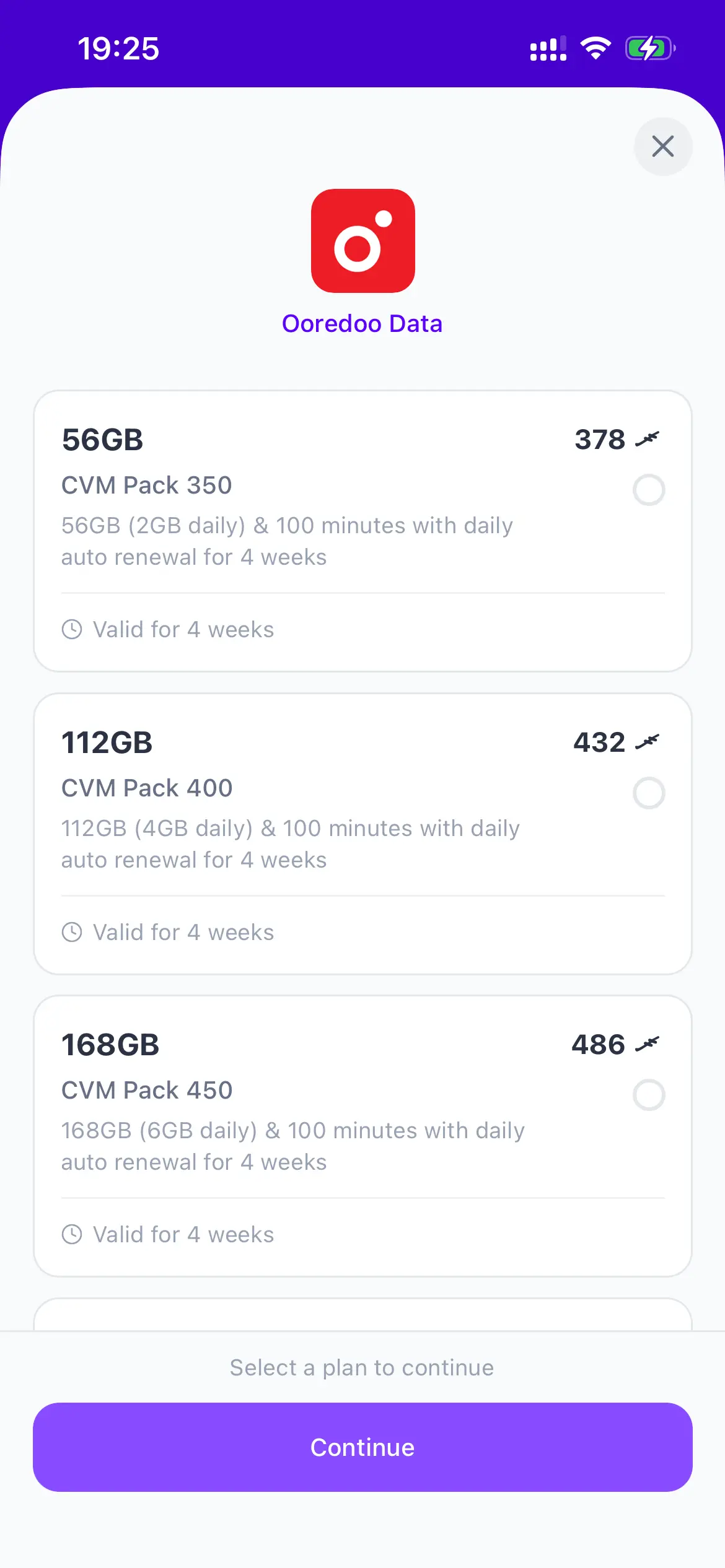
Ooredoo's data packs, as they appear in the app. Every one of them renews your allowance daily and includes 100 minutes.
56GB
MVR 378
2GB daily · valid 4 weeks
CVM Pack 350
112GB
MVR 432
4GB daily · valid 4 weeks
CVM Pack 400
168GB
MVR 486
6GB daily · valid 4 weeks
CVM Pack 450
196GB
MVR 594
7GB daily · valid 4 weeks
CVM Pack 550
224GB
MVR 702
8GB daily · valid 4 weeks
CVM Pack 650
Packs and prices are set by Ooredoo and shown here as of August 2026. The app always shows the current list, and the price you confirm there is the price taken from your wallet.
Step by step
How to buy a pack
You'll need the Payer app, an Ooredoo number and enough balance in your wallet.
- 01
Open Mobile data in the Payer app
Tap Mobile data on the Payer home screen. The Ooredoo data packs load straight away. You don't have to remember a USSD code or dial anything.
- 02
Pick a pack
Every pack shows its allowance, how much data you get per day, how long it runs for and what it costs, so you can compare them side by side.
Filter by validity if you know how long you need it for, and the list narrows to just those packs.
- 03
Confirm the number
Your own Ooredoo number is filled in already. Change it to any other Ooredoo number if you're buying data for someone else: a parent, a partner, a colleague on site.
- 04
Pay from your Payer wallet
Tap Pay and the pack price comes out of your Payer balance. No card details to type, no scratch card, no queue at an agent.
The receipt appears immediately and is saved in your Payer history, so you can find it again or share it with whoever you bought the data for.
Good to know
- Packs, allowances and prices are set by Ooredoo, not by Payer. The app always shows the current list.
- Data packs work on Ooredoo numbers only, the 7-digit numbers starting with 7 or 9.
- You'll need enough balance in your Payer wallet. Top up by bank transfer first; it's usually credited within seconds.
- Buying a pack for someone else doesn't need anything from them. You only need their number.
- Payer is licensed by the Maldives Monetary Authority, so the payment sits under the same rules as everything else in the app.
Wallet running low? Top up by bank transfer first, it's usually credited within seconds.
New to Payer?
A licensed wallet for the Maldives
Payer is the app you buy the data in. The same app pays your electricity bill, your internet, your cable TV and the shop down the road.
Payer has been building payments here since 2018, and has been licensed by the Maldives Monetary Authority since 2022. The app is free, there are no monthly fees, and you can read more about us before you sign up.
- One wallet, topped up from your bank
- Transfer from your bank account and the money lands in your Payer wallet, usually within seconds. That balance is what you spend from.
- Bills, recharges, QR and online
- Electricity, internet, cable TV, mobile recharge, cinema tickets, paying a shop by QR and checking out online, all in the same app.
- Licensed and safeguarded
- Payer is licensed by the Maldives Monetary Authority as a Payment Service Provider. Customer money is held in a safeguarded account with Maldives Islamic Bank, separate from the company's own funds.
Ooredoo data in Payer: your questions
How do I buy Ooredoo data with Payer?
Open the Payer app, tap Mobile data, pick a pack, confirm the Ooredoo number it's for and tap Pay. The price comes out of your Payer wallet balance and the receipt appears straight away.
Can I buy data for someone else's number?
Yes. Your own number is filled in by default, but you can change it to any Ooredoo number before you pay. The person you're buying for doesn't need the Payer app.
Does this work for Dhiraagu numbers?
The data packs on this screen are Ooredoo packs and only work on Ooredoo numbers. Payer supports other providers elsewhere in the app, and the home screen shows everything that's available.
How do I pay for the pack?
From your Payer wallet balance. You top the wallet up by bank transfer from your own bank account, and the money is usually credited within seconds. There's no card to enter and no scratch card to buy.
What if I don't have enough balance?
Top up your wallet first from the home screen, then come back to Mobile data. A payment is never part-completed: if the balance isn't there, nothing is charged.
Does Payer charge extra for buying data?
The price you see on the pack is the price taken from your wallet. Pack prices are set by Ooredoo and shown in the app before you confirm.
Is Payer safe to use?
Payer is licensed by the Maldives Monetary Authority as a Payment Service Provider under the National Payment System Act. Customer money is safeguarded in a separate bank account, held on your behalf and never mixed with the company's own funds.
Is the Payer app free?
Yes. The app is free to download on iOS and Android, there's no monthly fee, and you only pay for what you buy.
Still stuck? See all questions or talk to a human.
Let's get you started.
Pay bills, recharge and pay in store straight from your phone, with a licensed payment service provider behind every transaction.
Free to download. No monthly fees, no hidden charges.